How to Pay for Netflix from Russia in 2026: Step-by-Step Guide with VPN and Foreign Cards
A detailed step-by-step guide for 2026: how to choose a region, set up a VPN, create or recover an account, and pay for Netflix from Russia using gift cards or legitimate foreign cards. We'll guide you through the process in 60–120 minutes with minimal risks and checks at every stage.
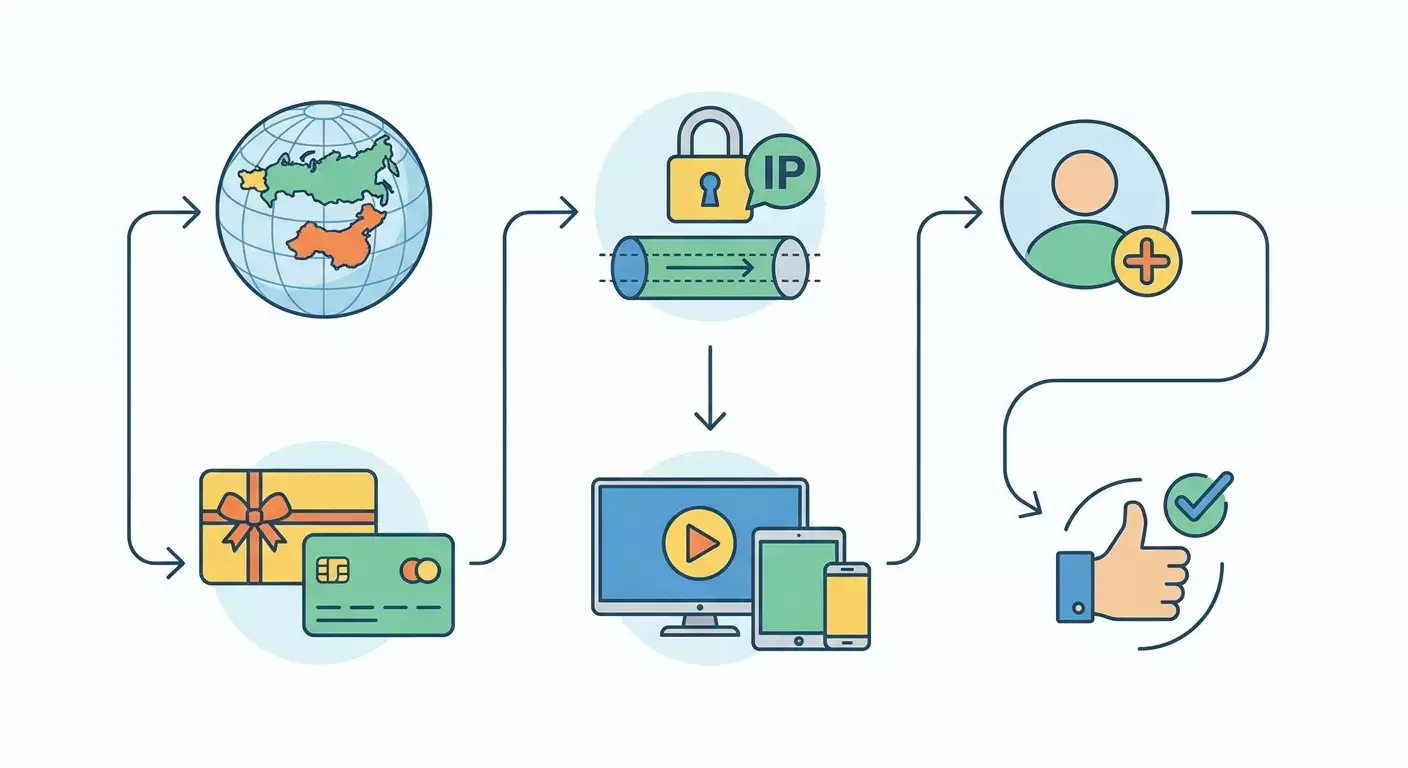
Content of the article
- Introduction
- Preparation
- Basic concepts
- Step 1: decide on strategy and region
- Step 2: set up vpn and verify connection cleanliness
- Step 3: create or prepare your netflix account
- Step 4: payment using netflix gift cards
- Step 5: payment using a foreign bank card
- Step 6: device setup, profiles, and reliable renewals
- Result check
- Common errors and fixes
- Additional options
- Faq
- Conclusion
Introduction
In this step-by-step guide, you'll learn how to pay for Netflix from Russia in 2026 using a VPN and legitimate payment methods like foreign cards or gift cards. We'll carefully walk through everything from preparation and strategy selection to activating your subscription and ensuring smooth renewals. The language is simple, steps are clear, and each action comes with a result check. By the end, you’ll have working Netflix access with an active subscription and a clear plan for ongoing management.
This guide is perfect for beginners who haven’t worked with VPNs or international payments before, as well as those wanting advanced tips to boost stability and reduce the risk of blocks. No special technical skills are needed—just follow the step-by-step instructions.
Before you begin, it's important to understand that Netflix access is directly restricted in Russia, so you'll need a VPN and a payment method from a country where Netflix is available. We'll cover legal and safe options, common risks, and how to minimize them. Keep in mind that using a VPN to bypass geo-restrictions may violate Netflix’s terms of service. You decide and proceed responsibly.
Time required: Completing all steps takes about 60 to 120 minutes. The longest parts are purchasing gift cards from a trusted source and payment verification via 3-D Secure when using a foreign card.
Preparation
Before starting, make sure you have the basic tools and access ready. This will shorten overall time and help avoid mistakes during critical steps.
Essential Tools and Access
- A device with internet access: a computer (Windows, macOS, Linux) or smartphone (iOS, Android).
- A working email you can access at all times.
- A mobile phone number, preferably not linked to old Netflix accounts to reduce regional conflicts.
- A VPN with an exit node in a country where Netflix operates and where you plan to make payment—for example, the USA, UK, EU, or some Asian countries. Stability of the IP is important.
- One payment method: a foreign bank card issued in your name (or a card from a relative/friend with their permission) OR Netflix gift cards for the chosen region.
System Requirements
- A stable internet connection: at least 10 Mbps for HD streaming and 25 Mbps for 4K.
- Enough free space on your device to install the VPN client (up to 200 MB).
- Updated browsers (Chrome, Firefox, Safari, Edge) and mobile operating systems not older than the last two major versions.
What to Download and Install
- The VPN client for your operating system (according to your chosen provider and protocol: WireGuard, OpenVPN, IKEv2, etc.).
- If needed, a password manager to securely store your data.
Backups and Security
- Save two-factor authentication backup codes for your email if enabled.
- Keep a separate note of your chosen region and payment method to avoid confusion during renewal.
⚠️ Important: Avoid using disposable or questionable emails. Losing access to your email means losing control over your subscription and account recovery.
Tip: Set up a separate browser profile for Netflix (a clean profile without cache or cookies) to avoid regional conflicts.
Basic Concepts
Key Terms Explained Simply
- Netflix Region — the country identified by your IP address and payment method. The available catalog and pricing depend on this region.
- VPN — a technology that creates an encrypted tunnel and changes your visible IP address to one from another country.
- Netflix Gift Card — a prepaid voucher for a specific region that can be redeemed on a Netflix account registered in the same region to pay for a subscription.
- Foreign Card — a bank card issued outside Russia in a country where Netflix is available. The card must support 3-D Secure for payment authorization.
How It Works
- Your account’s region is “locked in” when you register and pay for the first time. Changing it later without hassle is difficult.
- Gift cards only work in their respective regions. For example, a US gift card works only on a US account.
- If you pay with a foreign card, the country of the card must match the account’s region; otherwise, payment is likely to be declined.
- A stable, clean IP address reduces the risk of suspicious activity flags.
What to Understand Before Starting
- In 2026, Netflix continues to enforce anti-VPN policies and monitor payment methods. Our goal is to appear as a “normal” user from the chosen country.
- Legal restrictions and taxes in certain countries can affect pricing. This is normal and expected.
Tip: Pick one region and stick with it permanently. Switching IPs between countries increases the risk of payment blocks.
Step 1: Decide on Strategy and Region
Goal
Choose the country and payment method (gift card or foreign card) to follow a clear plan moving forward.
Step-by-Step
- Check if you have access to a foreign card. If you have a card issued in country A, it’s easier to pick region A.
- If you don’t have a card, consider how easy it is to get gift cards for a region that’s easy to maintain (e.g., USA, UK, Germany, Spain, Mexico). Remember gift cards must match the account’s region.
- Compare approximate prices. Some countries offer lower prices but higher chances of payment rejections. Regions with active gift card markets are generally more reliable.
- Pick one region, for example, the USA for gift cards and broad device compatibility.
- Write down your chosen region, payment method (gift cards or foreign card), and commit to the plan.
Important Notes
- Unified Region: VPN country, gift card region, and payment card country (if paying by card) must be the same.
- Renewal Planning: Figure out how you'll top up balance or renew cards every 1–12 months.
⚠️ Warning: Don't choose regions where acquiring gift cards legally is tough or where foreign cards are frequently blocked. It saves time and hassle.
Tip: If ease is more important than cost, pick a region with a predictable supply of gift cards like the USA or UK.
Expected Result
You’ll have your selected country, payment method, and renewal plan noted down.
Common Issues and Solutions
- Issue: Can't decide on region. Solution: Choose a country where you can easily get gift cards from trusted sellers or friends abroad.
- Issue: Worried card won’t work. Solution: Use gift cards instead—they usually have minimal rejection risk when regions match.
✅ Check: Region chosen, payment method selected, renewal plan recorded. Ready to set up VPN.
Step 2: Set Up VPN and Verify Connection Cleanliness
Goal
Configure a stable VPN with an IP from the chosen country, eliminate leaks, so Netflix correctly identifies your region and doesn't flag you as suspicious.
Step-by-Step
- Choose your VPN protocol: WireGuard for speed and efficiency, OpenVPN for broad compatibility, IKEv2 for mobile stability.
- Install the VPN client for your OS and import the config for your chosen country (e.g., USA).
- Connect to the server and wait for “Connected” status—usually 3–10 seconds.
- Check the current IP and geolocation via an IP check service in your browser; it should show your selected country.
- Ensure no DNS leaks and disable IPv6 temporarily if your ISP does not secure it properly. This reduces discrepancies.
- Disable WebRTC in your browser or use an extension to block IP leaks via WebRTC.
- Create a clean browser profile (or use a different browser) to avoid leftover region data in cache.
Expert VPN Advice
To reduce risks of detection, consider a personal VPN server with a dedicated IP. This lowers the chance your traffic blends into a frequently flagged pool of shared IPs. One solid option is vpn.how: they set up personal, no-log servers within 5 minutes after payment, supporting WireGuard, OpenVPN, IKEv2, L2TP, and SSTP. Locations include Moscow, St. Petersburg, Amsterdam, Frankfurt, London, New York, San Jose, Chicago, Singapore, Sydney, Madrid, Helsinki, Stockholm, Warsaw, Copenhagen, Stavanger. They accept Russian cards (including Tinkoff and Ozon), SBP, and USDT/BTC. Prices start at 490 ₽ per day and 2490 ₽ per month, with discounts for longer terms. You don’t need a foreign card to rent, which is handy when starting out.
Important Notes
- Consistent IP from the same server reduces account behavior anomalies.
- DNS resolution should be within the chosen region without leaks to Russian DNS servers.
Tip: Note your server name (e.g., us-nyc-01) and always use it for Netflix login and payments. Stability is your ally.
Expected Result
Your browser and device appear to be located in the selected country. No DNS or WebRTC leaks. IP address is stable.
Common Issues and Solutions
- Issue: IP check shows the wrong country. Solution: Reconnect to a different server in your chosen country or clear browser cache/restart browser.
- Issue: DNS leaks detected. Solution: Change VPN DNS settings to a provider in your chosen country or force custom DNS via client.
✅ Check: Any IP checker shows your selected region. Netflix's homepage displays in the local language or English for that country when accessed without signing in.
Step 3: Create or Prepare Your Netflix Account
Goal
Create a new Netflix account in your chosen region or “clean” an existing account of conflicting data before payment.
Step-by-Step
- Connect your VPN and make sure it’s active. Double-check your IP.
- Open your browser with a clean profile. If you already have an account, log out from all devices and clear Netflix cookies and cache.
- To create a new account, click “Sign In” or “Join Now,” then “Create Account.” Enter a working email and strong password.
- Confirm your email if prompted by Netflix. Follow the link in the email. If you don’t see it, check your spam folder.
- When prompted to select a plan, pick your target subscription. The basic plan is fine for testing—you can upgrade later.
- If you have an account from another country, it’s safer to make a new one using a different email to avoid regional conflicts and surprise price changes.
- Stop before payment. Decide whether you’ll enter a gift card code or add a bank card. Proceed to the corresponding guide section.
Important Notes
- Phone number should only be added if you’re confident in the region’s stability. Sometimes it’s used for verification.
- Consistent IP and browser profile help prevent accidental region changes.
Tip: If returning to an old account and old payment methods remain saved, remove them before adding new ones to reduce the chance of cascading payment errors.
Expected Result
You have a new Netflix account created in your selected region or an existing account cleaned of conflicting data and old payment methods, ready for payment.
Common Issues and Solutions
- Issue: Confirmation email doesn't arrive. Solution: Check spam, wait 5–10 minutes, request resend.
- Issue: Incorrect currency shown. Solution: Clear cache and cookies, ensure VPN is connected to the right country, reload Netflix site.
✅ Check: Plan selection page shows currency for your chosen region; no old payment methods linked; ready to proceed with payment.
Step 4: Payment Using Netflix Gift Cards
Goal
Activate your Netflix subscription using gift cards from your chosen region. This is the most independent payment method for users in Russia.
Step-by-Step
- Confirm your region matches the gift card region. For example, a US gift card is for a US account.
- Buy digital Netflix gift cards from a trusted seller or ask a friend in the chosen country to purchase it in-store. Pick a denomination that covers your plan and desired duration.
- Get your gift card code—a series of characters, usually 11–16 digits or letters (format varies by region).
- Connect your VPN to the chosen country and log into your Netflix account.
- Go to the "Redeem gift card" or equivalent section in your account settings (usually under “Account”).
- Enter the code exactly as shown. Double-check letters and numbers. Click “Redeem” or “Apply.”
- Check your account balance: it should reflect the added amount and show the next billing date. If you haven’t chosen a subscription plan yet, pick one and confirm using the gift card balance.
Important Notes
- Region match is essential. Redemption will fail if regions don’t match.
- Balance stacking: you can redeem multiple cards in a row to pay for 3–12 months ahead, avoiding frequent top-ups.
Tip: For a longer subscription period, redeem several cards at once and forget about renewals for months.
Tip: Store gift card codes securely in a password manager or encrypted note in case you need to verify again.
Expected Result
Your account balance increases by the gift card amount, your subscription activates for the selected plan, and the next billing date is visible.
Common Issues and Solutions
- Issue: Code not accepted. Cause: Region mismatch or code already used. Fix: Verify VPN location and account region; contact card seller if you suspect a used code.
- Issue: Balance credited but subscription not active. Cause: Plan selection incomplete. Fix: Return to plan page, select and confirm charge from gift card balance.
✅ Check: Account shows positive balance in regional currency. Subscription marked active with next billing date.
Step 5: Payment Using a Foreign Bank Card
Goal
Add and verify a foreign card matching your account region for automatic deduction in the correct currency.
Step-by-Step
- Make sure your foreign card was issued in your selected region or at least supports payments in that country. For the highest success, the card’s country and account region should match.
- Connect VPN to selected region and log into Netflix.
- Navigate to the payment section and choose “Credit or Debit Card.”
- Enter card details: number, expiration, CVC. Provide the cardholder name exactly as registered by the bank.
- Enter the billing address in the same country — this is mandatory. Use a legitimate address linked to the card (or owner’s address if it’s a relative/friend’s card).
- Confirm the payment. If 3-D Secure triggers, enter the code sent by your bank or confirm via the banking app.
- Wait for “Successfully added” status. Netflix will show your active subscription, next billing date, and linked card.
Important Notes
- Billing address is critical — a mismatch increases payment failure risk.
- 3-D Secure must be active on the card; otherwise, banks often block international online subscriptions.
Tip: If using a relative’s card, coordinate timing with them to be available for 3-D Secure verification.
Tip: Some banks are stricter on first attempts; if declined, wait 24 hours and try again with perfect region, IP, and address alignment.
Expected Result
Your foreign card is successfully linked, subscription is active, and next automatic payment date is shown.
Common Issues and Solutions
- Issue: Payment declined. Cause: Country mismatches or VPN suspicion. Fix: Confirm you use the correct country IP and billing info. Retry after some time.
- Issue: No 3-D Secure. Fix: Enable it via your bank app or support, or use gift cards instead.
✅ Check: Your card appears in payment methods, Netflix subscription active with next billing date confirmed.
Step 6: Device Setup, Profiles, and Reliable Renewals
Goal
Ensure seamless streaming on your devices and predictable subscription renewal without surprises.
Step-by-Step
- Install the Netflix app on your devices: Smart TV, set-top box, PC, or smartphone. Log in with your account.
- Create profiles for every family member. Set parental controls if needed.
- Check streaming quality. Start a show and do a quality diagnostic (via app or browser shortcuts) to confirm resolution matches your subscription.
- Always use the same VPN server and browser profile for login and payment management. Simple viewing on some devices may not require VPN, but test carefully.
- If using gift cards, plan to top up your balance 3–5 days before it runs out. Set calendar reminders.
- If paying by card, keep enough funds before billing dates. Re-link new cards following step 5 when changing payment methods.
Important Notes
- Different devices handle VPNs differently. If your Smart TV can’t stream, check DNS settings and consider running VPN at the router level.
- App updates may change geo-detection behavior. Retest after major updates.
Tip: If your router supports WireGuard or OpenVPN, set up a tunnel and create a separate Wi-Fi network "for Netflix" so home devices automatically use the correct region.
Tip: Keep a backup payment method (e.g., a small balance on a gift card) for emergencies if your bank requests re-verification unexpectedly.
Expected Result
Netflix streams smoothly on all your devices, profiles are set up, and renewal plans are clear—automatic card charges or scheduled gift card top-ups.
Common Issues and Solutions
- Issue: TV shows content unavailable. Fix: Verify DNS settings and use VPN on the router or watch via a set-top box with stable VPN.
- Issue: Quality drops to SD. Fix: Check VPN bandwidth, switch to a server closer to your ISP’s backbone, or change VPN protocol to WireGuard.
✅ Check: Playback runs without errors, resolution matches your plan, and renewal reminders are set in your calendar.
Result Check
Checklist
- Region picked and recorded.
- VPN set up, IP stable, no leaks.
- Netflix account created or cleared of conflicting info.
- Subscription activated via gift cards or foreign card.
- Devices authorized, profiles created.
- Renewal plan clear and noted in calendar.
How to Test
- Go to your account page and verify active subscription status and correct billing date.
- Play 2–3 different titles, including 'local' content for your chosen country. They should be accessible.
- Toggle VPN on and off to observe behavior. Always use VPN for subscription management and payments.
Success Indicators
- No errors logging in or paying.
- Stable stream quality matching your plan (HD/4K).
- Predictable next billing date and confirmed payment method.
Common Errors and Fixes
- Issue: Netflix rejects gift card. Cause: Card region doesn’t match account region. Fix: Verify VPN locale, account currency, and card region. Correct mismatches.
- Issue: Foreign card won’t add. Cause: Incorrect billing address or no 3-D Secure. Fix: Enter address within card’s country and enable 3-D Secure.
- Issue: Frequent login and verification requests. Cause: Changing IP and country often. Fix: Use the same server and browser profile consistently.
- Issue: Low video quality. Cause: Limited bandwidth or overloaded VPN server. Fix: Switch to a better server in the same country or try WireGuard protocol.
- Issue: TV app won’t open content. Cause: DNS leaks. Fix: Set DNS for the region on your router or use VPN at the network level.
- Issue: Payment fails on billing day. Cause: Insufficient funds or bank requires re-authentication. Fix: Top up your card in advance and keep the cardholder’s phone handy for 3-D Secure verification.
- Issue: Account activation error after a long break. Cause: Old cookies. Fix: Clear browser cache and cookies, then log in again via VPN in your region.
⚠️ Warning: Don’t buy rented or stolen Netflix accounts—it risks data leaks and losing money. Use only your own account and legal payment methods.
Additional Options
Advanced Settings
- Use WireGuard on a router with routing policies: send only Netflix traffic through VPN, keep the rest direct.
- Have multiple configs in neighboring cities within your chosen country for quick swaps during server overloads.
- Pin code for profiles and 2FA on email for added security.
Optimization
- Prepay subscription with gift cards for 6–12 months if reliable code supply is available.
- Keep a backup payment method: a small balance on your account or a second card from the same region.
Other Ideas
- Create a separate home Wi-Fi network dedicated to streaming.
- Use set-top boxes with VPN configured strictly for the target country.
Tip: If you plan to travel to your chosen region’s country, use that time for important actions: changing plans, re-linking cards—to lower the risk of additional checks.
FAQ
- Can I pay for Netflix directly with a Russian card? In 2026, no. Use gift cards from the appropriate region or a foreign card from that country.
- Which is more reliable: gift cards or foreign card? Gift cards are more predictable. Cards are convenient for automatic payments but require strict region matching and stable 3-D Secure.
- Do I have to keep VPN on all the time? Use VPN of the chosen region for payments and account management. Sometimes VPN isn’t required for watching, but test on your devices.
- Can I change my region after registration? Technically yes, but it’s complicated and risky. Easier to create a new account for the new region.
- What if a gift card only partially covers the cost? The balance is used first; then the linked card is charged. If no card linked, top up with another gift card before the balance runs out.
- Will a virtual foreign card work? Depends on the issuer. If issued in the correct country with 3-D Secure and a proper billing address, chances are good. Otherwise, gift cards are safer.
- Why is my price higher than advertised? Most likely due to local taxes or different regional rates. This is normal.
- How often should I change VPN servers? Ideally not. A stable dedicated IP reduces behavioral anomalies and additional checks.
- Can I watch in 4K? Yes, with the right plan, compatible device, and internet speed of 25 Mbps or higher.
- What if my bank suddenly blocks renewal? Check 3-D Secure, balance, billing address, and IP location. As a last resort, pay with gift cards temporarily and sort things out with your bank without losing your subscription.
Tip: Keep a log of your actions: which VPN server you used, when you changed cards, when you topped up balance—it helps quickly troubleshoot issues.
Conclusion
You’ve completed the full setup: chosen your strategy and region, configured a stable VPN with a clean IP, created or prepared your Netflix account, paid via gift card or foreign card, set up devices and secured predictable renewals. Now you have a reliable process you can repeat month after month without surprises. If regional rules change in the future, you’ll have alternative payment methods and a clear set of checks ready.
You can further automate this process on your router, schedule connection quality checks, and set alerts for billing dates. Keep a close eye on IP stability and region alignment — this is key to trouble-free access. Enjoy your viewing!
⚠️ Important: Follow your country’s laws and service terms. This guide is for informational purposes; you are responsible for your access and payment choices.